 Zudo Works
Tables everywhere: filter, sort, search and 100+ tools
Where: every table — built-in lists (/items, /sales/orders, …), custom-form records (/forms/<slug>), the report chooser (/reports/<module>) and saved reports. The tools below are part of the shared table component, so a table you create tomorrow has them too.
Header menu
Point at a column header (or tab to it) and open ▾: sort ascending / descending / clear, filter this column, pin left / right, no wrap, autosize, hide, group by this column, summary (count, sum, average, min, max) and column statistics.
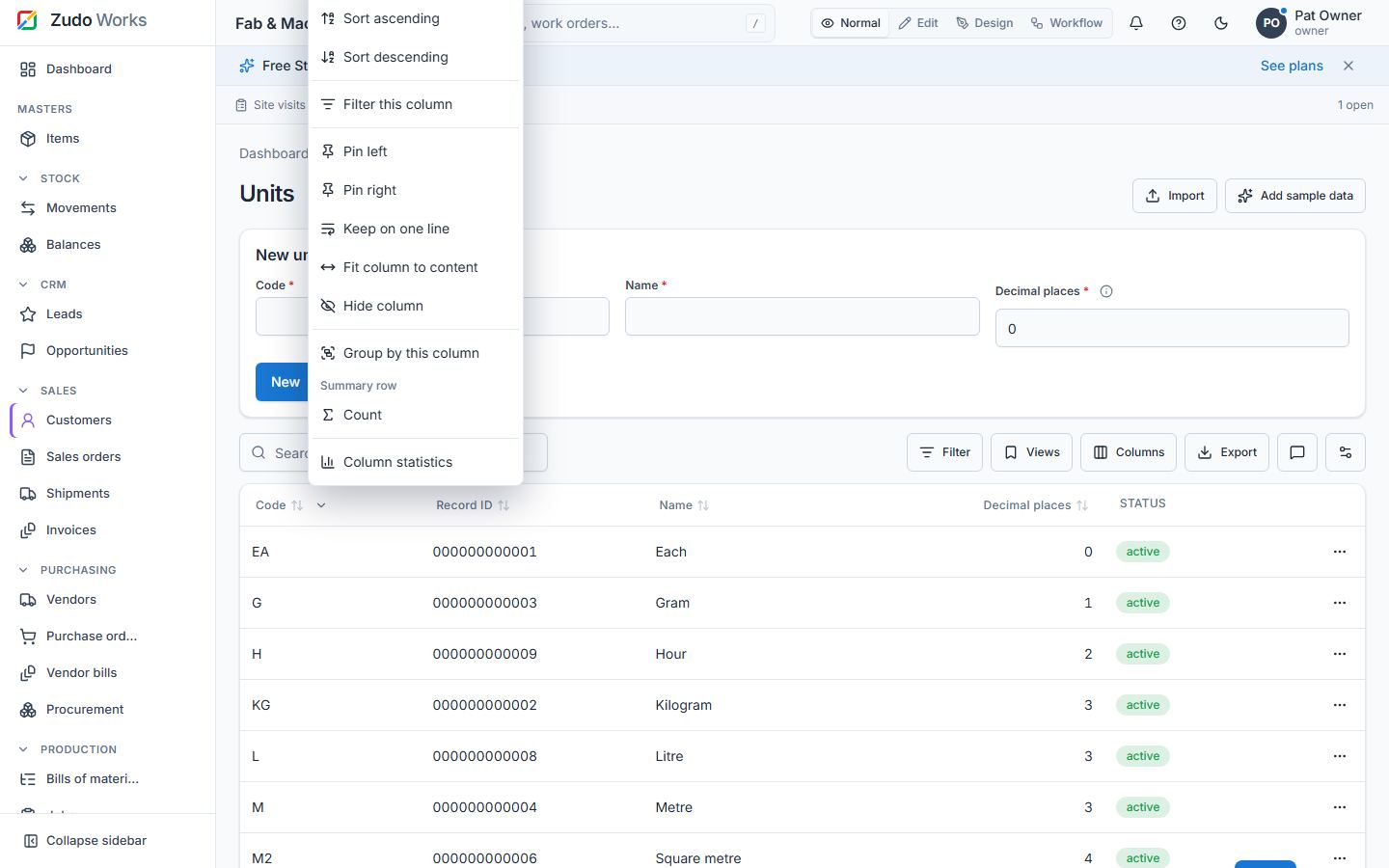
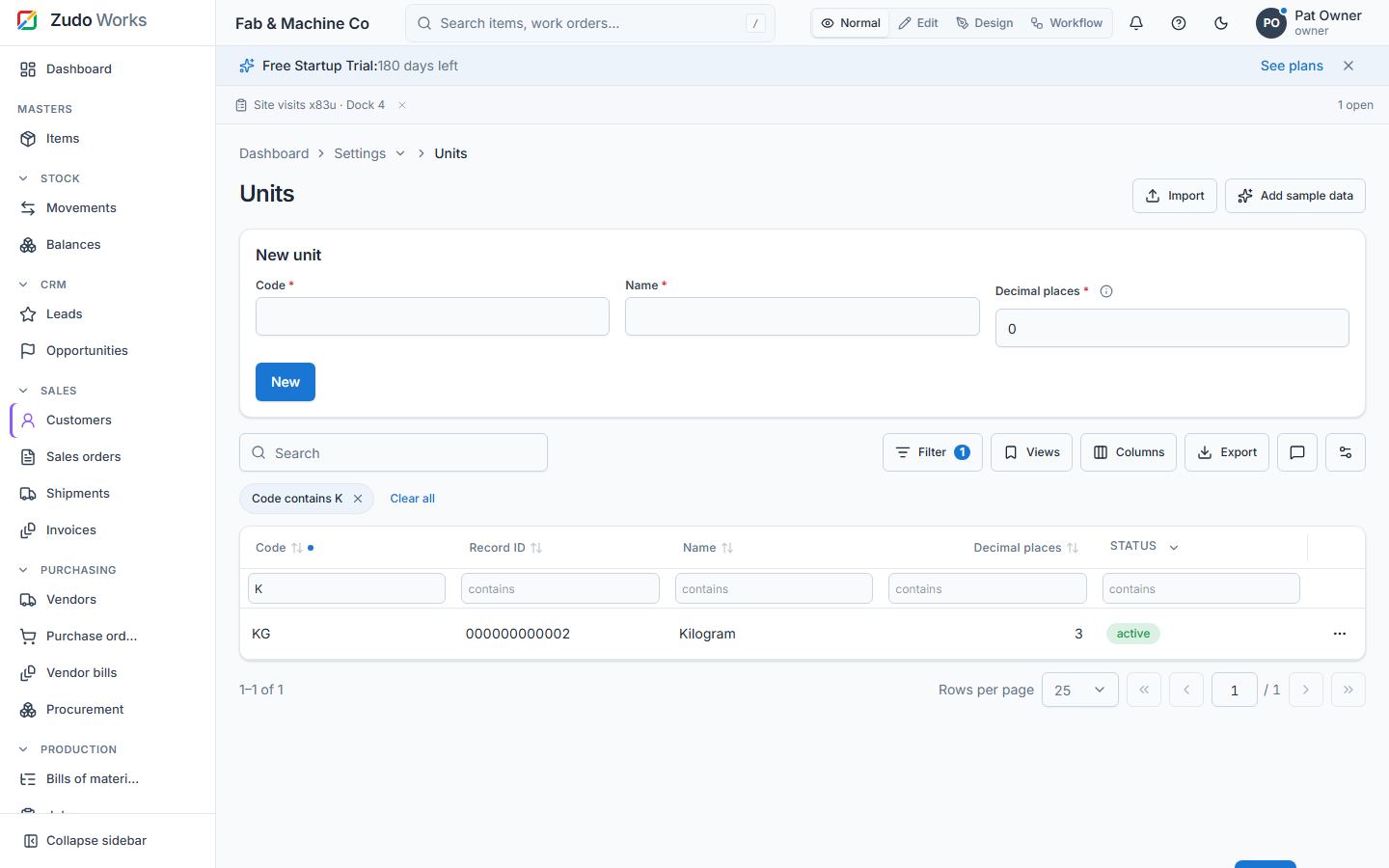
Filter row, builder and chips
More → Filter row adds an input under every header: type to filter that column; numbers and dates get from / to inputs. The Filter button opens the builder (match all / any), and every active condition shows as a chip you can remove. The operators:
| Type | Operators |
|---|---|
| Text | equals, not equals, contains, not contains, starts with, ends with, in, not in, empty, not empty |
| Number | equals, not equals, >, <, ≥, ≤, between, in, not in, empty, not empty |
| Date | equals, before, after, between, today, yesterday, this week, this month, this year, last 7 / 30 / 90 days, next 7 / 30 days, empty, not empty |
| Boolean / enum | equals, not equals, in, not in |
Custom-form record tables send their filters to the API, so they apply to all records, not just the loaded page; the system fields (record ID, record number, created / updated at and by) filter the same way. A paginated built-in table (items) filters the loaded page.
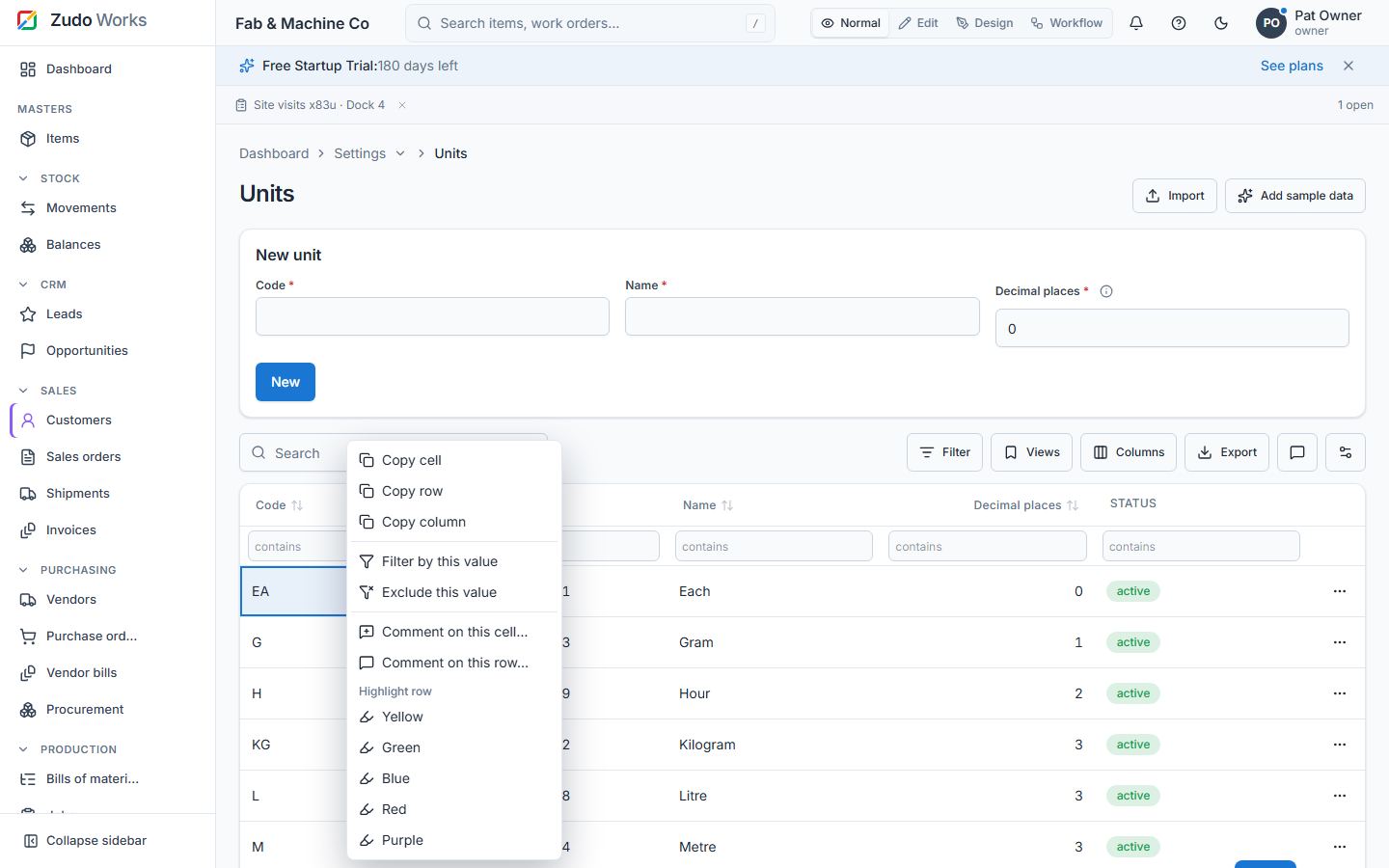
Cells, keyboard and the right-click menu
Click a cell to select it; arrows move, Shift extends a range, Ctrl / ⌘ + C copies the cell or the range (tab-separated — paste straight into a spreadsheet), Ctrl / ⌘ + A selects everything visible, F2 edits an editable cell, Esc clears. Right-click (long-press on a phone) opens the menu: copy cell / row / column, filter by this value, exclude this value, comment on this cell / row, highlight the row (five colours), edit, select the row, open the record.
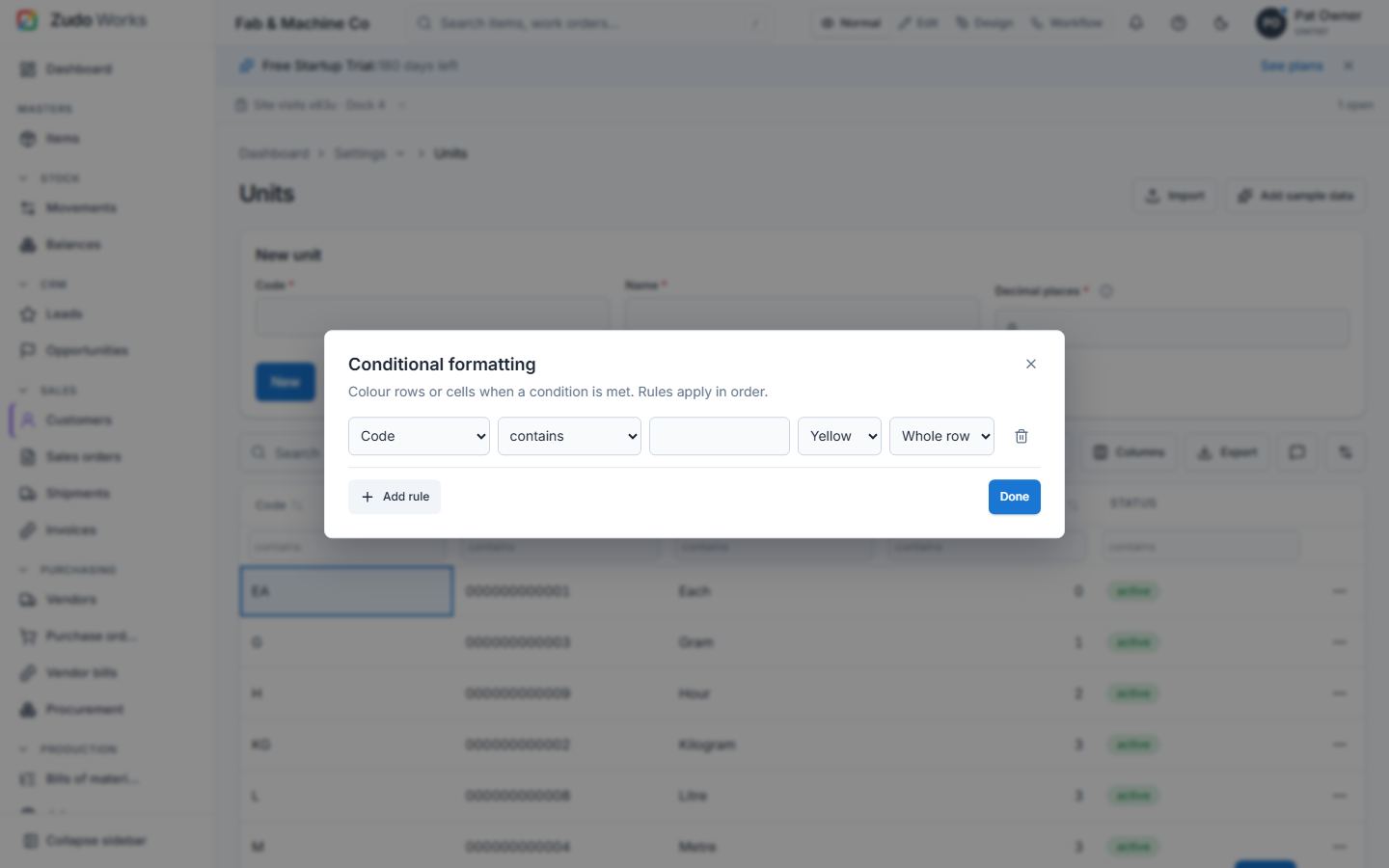
Highlights, formatting, summary, groups and options
- Highlight a row from the menu; More → Clear highlights removes them all.
- More → Conditional formatting: rules of column · operator · value · colour · scope (the whole row or just the cell). Rules travel with share links and saved views.
- Summary row per column from the header menu; group by a column for collapsible groups with counts.
- More: filter row, row numbers, zebra, density, full screen, print, share link (the sort, filters, groups, summary and formatting are in the
?tv=part of the address and apply when someone opens it), ungroup. - Selected rows: export only those, or bulk edit one field across them. Page size All shows everything.
The tools, one by one
| # | Area | Tool | Where |
|---|---|---|---|
| 1 | Tables | Header menu on every column (▾ on hover / focus) | every table |
| 2 | Tables | Sort ascending / descending / clear from the menu; Shift+click adds a second sort key | every table |
| 3 | Tables | Filter this column from the header menu | every table |
| 4 | Tables | Filter row under the headers (More → Filter row) | every table |
| 5 | Tables | Quick filter per column; from / to inputs for numbers and dates | every table |
| 6 | Tables | Filter builder: match all / any, add, remove, clear all | every table |
| 7 | Tables | Filter chips showing every active condition | every table |
| 8 | Tables | Operators: equals, not equals, contains, not contains, starts with, ends with, in, not in, between, >, <, ≥, ≤, empty, not empty | every table |
| 9 | Tables | Relative dates: today, yesterday, this week, this month, this year, last 7 / 30 / 90 days, next 7 / 30 days | every table |
| 10 | Tables | Search box across the visible columns | every table |
| 11 | Tables | Pin a column left or right; unpin | every table |
| 12 | Tables | Hide a column; column picker with Reset columns | every table |
| 13 | Tables | Autosize a column to its content; resize by dragging the header edge | every table |
| 14 | Tables | No-wrap toggle per column | every table |
| 15 | Tables | Group by a column: collapsible groups with counts | client-side tables |
| 16 | Tables | Summary row: count, sum, average, min, max per column | every table |
| 17 | Tables | Column statistics dialog (distinct values, min, max, average, empties) | every table |
| 18 | Tables | Cell selection by click; the active cell is announced for screen readers | every table |
| 19 | Tables | Arrow keys move the selection; Shift+arrows and Shift+click select a range | every table |
| 20 | Tables | Ctrl / ⌘ + C copies the cell or the range (tab-separated, pastes into a spreadsheet) | every table |
| 21 | Tables | Ctrl / ⌘ + A selects every visible cell; Esc clears the selection | every table |
| 22 | Tables | F2 edits the active cell when the column is editable | editable tables |
| 23 | Tables | Right-click (or long-press) context menu on any cell or row | every table |
| 24 | Tables | Copy cell / copy row / copy column from the menu | every table |
| 25 | Tables | Filter by this value / exclude this value from the menu | every table |
| 26 | Tables | Highlight a row in one of five colours; clear one or all highlights | every table |
| 27 | Tables | Conditional formatting rules: column, operator, value, colour, scope (row or cell) | every table |
| 28 | Tables | Density: compact rows | every table |
| 29 | Tables | Row numbers | every table |
| 30 | Tables | Zebra stripes | every table |
| 31 | Tables | Full-screen table | every table |
| 32 | Tables | Print the table (print-ready page, also Save as PDF) | every table |
| 33 | Tables | Share link: sort, filters, grouping, summary and formatting travel in ?tv= and apply on arrival | every table |
| 34 | Tables | Export the selected rows only | selectable tables |
| 35 | Tables | Bulk edit the selected rows (one field, one value) | selectable tables |
| 36 | Tables | Page size "All" | paged tables |
| 37 | Tables | Table state remembered per table and per person (columns, sort, filters, options) | every table |
| 38 | Tables | The report chooser is a table: search, sort, export, open a report by clicking its row | /reports |
| 39 | Tables | Custom-form record tables send their filters to the API (server-side), system fields included (record ID, record number, created / updated at and by) | custom forms |
| 40 | Tables | Open the record / select the row from the menu | every table |
| 41 | Tables | Comment dots on cells and rows with open threads | every table |
| 42 | Comments | Comment on a single cell (right-click → Comment on this cell) | every table |
| 43 | Comments | Comment on a row | every table |
| 44 | Comments | @mention colleagues with suggestions while typing | comments |
| 45 | Comments | A mention notifies the person (bell and e-mail digest where enabled) | comments |
| 46 | Comments | Resolve and reopen a thread | comments |
| 47 | Comments | Edit and delete your own comments (owners: anyone's) | comments |
| 48 | Comments | Comments panel per table: every open thread, jump to the cell | every table |
| 49 | Comments | Open-thread count on the table's Comments button | every table |
| 50 | Comments | /comments API and the /directory/users people list | API |
| 51 | Fields | An API name on every custom-form field, derived from the label (Sales order description → sales-order-description), unique per form | form builder |
| 52 | Fields | The API name follows the label until you edit it; shown under the label | form builder |
| 53 | Fields | Records API reads and writes by API name (?keys=api) | API |
| 54 | Fields | Built-in field catalogue for items, customers, vendors, sales orders, purchase orders, jobs and work centres | form builder |
| 55 | Fields | The builder of a built-in form lists its built-in fields with their API names | form builder |
| 56 | Fields | Rename a built-in field | form builder |
| 57 | Fields | Reorder built-in fields | form builder |
| 58 | Fields | Hide an optional built-in field | form builder |
| 59 | Fields | Help text per built-in field | form builder |
| 60 | Fields | Built-in forms and tables follow the overrides everywhere | app |
| 61 | Schedules | Schedules page under Settings → Low-code → Automation | /automation/schedules |
| 62 | Schedules | Once at a date and time | schedules |
| 63 | Schedules | Every N minutes (1 minute to a week) | schedules |
| 64 | Schedules | Daily at a time of day | schedules |
| 65 | Schedules | Weekly on chosen weekdays | schedules |
| 66 | Schedules | Monthly on a day of the month (29–31 fall back to the last day) | schedules |
| 67 | Schedules | From / to dates limit any cadence | schedules |
| 68 | Schedules | Runs in the workspace's time zone; next run shown | schedules |
| 69 | Schedules | Action: update fields of the records that match a condition (built-in module or custom form) | schedules |
| 70 | Schedules | Action: run a workflow function with arguments | schedules |
| 71 | Schedules | Action: import the next batch of a CSV file | schedules |
| 72 | Schedules | Run now | schedules |
| 73 | Schedules | Run log with a summary per run (matched, updated, inserted, failed, errors) | schedules |
| 74 | Schedules | Pause and resume | schedules |
| 75 | Schedules | Runner claims due schedules with row locks (SKIP LOCKED) and recovers stale runs | server |
| 76 | Imports | Import button on every section page and on every custom form | sections |
| 77 | Imports | CSV upload or paste; comma, semicolon, tab and pipe delimiters detected; RFC 4180 quoting | import dialog |
| 78 | Imports | Automatic column mapping by header names and aliases | import dialog |
| 79 | Imports | Mapping editor with required fields marked | import dialog |
| 80 | Imports | Update existing rows by a key field (code or name) or insert only | import dialog |
| 81 | Imports | Validation of every row before anything is written; per-row messages | import dialog |
| 82 | Imports | Up to 200 valid rows import at once, in batches of 50 | import dialog |
| 83 | Imports | Larger files (up to 100 000 rows, 20 MB) import on a schedule, 200 rows per run, so the database is never flooded | import dialog |
| 84 | Imports | Progress and summary: inserted, updated, failed | import dialog |
| 85 | Imports | Error CSV download (the failed rows with their messages) | import dialog |
| 86 | Imports | Template CSV download per target | import dialog |
| 87 | Imports | Imports page with status, counts and the schedule link | /automation/imports |
| 88 | Imports | Cancel an import | imports |
| 89 | Imports | Lookups resolved by code or name when importing custom-form records | imports |
| 90 | CRM | Leads: contact, company, source, status, owner, estimated value, notes | /crm/leads |
| 91 | CRM | Convert a lead into a customer (new or existing) and, optionally, an opportunity | /crm/leads |
| 92 | CRM | Opportunity board by stage; move a deal from its card | /crm/opportunities |
| 93 | CRM | Opportunity list and pipeline totals: count, value and weighted value | /crm/opportunities |
| 94 | CRM | Stage probabilities (qualification 20 %, proposal 50 %, negotiation 75 %, won 100 %) | /crm/opportunities |
| 95 | CRM | Create a quote from a deal (customer and deal prefilled) | /crm/opportunities |
| 96 | CRM | Confirming an order marks its deal won | sales |
| 97 | CRM | Quotes count on every deal | /crm/opportunities |
| 98 | Documents | Shipments / delivery notes (DN-…) from confirmed sales orders | /sales/shipments |
| 99 | Documents | Outstanding quantity per order line | /sales/shipments |
| 100 | Documents | Partial deliveries | /sales/shipments |
| 101 | Documents | Ship: posts the stock issue (ISS-…), fulfils the order lines, idempotent | /sales/shipments |
| 102 | Documents | Cancel a draft shipment | /sales/shipments |
| 103 | Documents | Invoices (INV-…) drafted by hand, from an order or from a shipment | /sales/invoices |
| 104 | Documents | Tax rate, due date, subtotal / tax / total computed as you type | /sales/invoices |
| 105 | Documents | Issue and void an invoice | /sales/invoices |
| 106 | Documents | Payments (PAY-…): method, reference, partial payments, balance, paid status | /sales/invoices |
| 107 | Documents | Remove a payment (reopens the invoice) | /sales/invoices |
| 108 | Documents | Invoice PDF | /sales/invoices |
| 109 | Documents | Overdue marker and summary: open balance, overdue, paid this month | /sales/invoices |
| 110 | Documents | Vendor bills (BILL-…) from purchase orders | /purchasing/bills |
| 111 | Documents | Approve, void and pay a bill (VPAY-…) | /purchasing/bills |
| 112 | Documents | Create shipment / invoice buttons on the sales order; Create bill on the purchase order | orders |
| 113 | Documents | Webhooks shipment.shipped, invoice.issued, invoice.paid, vendor_bill.approved | integrations |
| 114 | Quality | Inspections (INS-…): source, document, item, quantities, result, inspector, checklist | /quality/inspections |
| 115 | Quality | Passed quantity and result follow the inspected / failed quantities as you type | /quality/inspections |
| 116 | Quality | Raise an NCR from a failed inspection in one click | /quality/inspections |
| 117 | Quality | NCRs (NCR-…): severity, quantity, containment, root cause, disposition, owner, due date | /quality/ncrs |
| 118 | Quality | NCR states: open → under review → corrective action → closed (reopen allowed) | /quality/ncrs |
| 119 | Quality | Open a CAPA from an NCR | /quality/ncrs |
| 120 | Quality | CAPAs (CAPA-…): corrective or preventive, actions, owner, due date, effectiveness check | /quality/capas |
| 121 | Quality | CAPA states: open → in progress → verified → closed | /quality/capas |
| 122 | Quality | Webhooks ncr.opened, ncr.closed | integrations |
| 123 | Quality | KPIs: pass rate, failed inspections, open NCRs, open CAPAs, overdue CAPAs | quality |
| 124 | Platform | A 12-digit record ID on every new document | app |
| 125 | Platform | Gapless numbering per document type (DN, INV, PAY, BILL, VPAY, INS, NCR, CAPA) | app |
| 126 | Platform | Sample data for the eight new sections (598 sample records in all) | settings |
| 127 | Platform | Sidebar groups CRM and Quality; Shipments, Invoices and Vendor bills entries | sidebar |
| 128 | Platform | The user guide as a page (/guide) and public at /docs: contents, search, screenshots, code examples | /guide |
Last updated